About this game
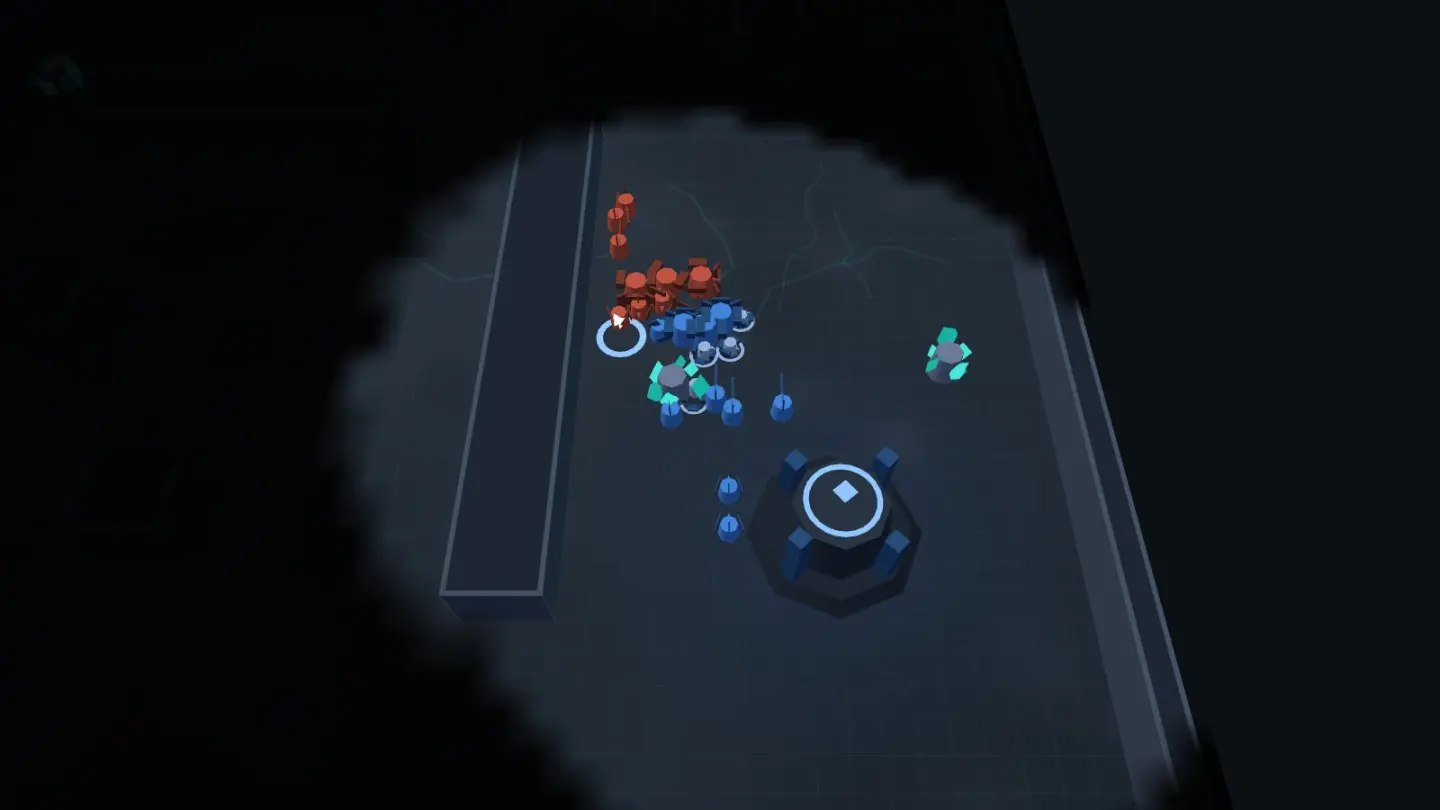
Korveth is a strategy game about building an army faster than the other side. You start with a base, four workers and two fighters. Across the map, a rival called the Skarn starts with exactly the same, and it is growing while you are.
There is one thing to collect: crystal. Your workers dig it and carry it home, and your base turns it into units. You can build three kinds of fighter, and each one beats a different one. Spikers are cheap and fast, so they reach the archers before the archers can shoot twice. Lancers shoot from a distance, so they wear down the heavy units before those get close. Bulwarks are slow and tough, so the cheap fighters die trying to get through them.
Lancers and Bulwarks need a Forgespire standing first, and that costs crystal and time. So the real decision in every match is the same one: the army you can afford right now, or the better army you'd have if you waited.
The Skarn is not cheating and it is not following a script. It digs, saves, builds and attacks using the same commands you have, and it can only see what its own units can see, just like you. Pick the speed on the title screen and you're choosing how fast it grows, not how much it knows.
When the battle ends you get a link. Open it and the whole match plays back, exactly as it happened — every move, in order.
How to play
- Get your workers digging. Drag a box around them, then right-click a crystal patch. Four workers is a start, not an economy. Your base makes more of them cheaply, and most lost matches are ones where you stopped making them early on.
- Click your base to see what you can build. Q makes a worker, W makes a Spiker, T builds the Forgespire. E and R are the Lancer and the Bulwark, and they stay greyed out until the Forgespire is up. Every button shows what it costs and why you can't press it yet.
- Look before you commit. You can only see where your units are, and the Skarn is under the same limit. One fighter sent the long way round the map is worth more than the fight it would have died in — spotting their Forgespire tells you which army is coming.
- Move as a group. Press Ctrl and a number to name a group, then that number to call it back. Press A then click, and the group walks there and fights anything it meets on the way. That's what you want whenever you cross the middle of the map.
- Knock the base down. A side loses when its last building falls, so winning a fight isn't winning the match. Take the buildings while the army that would defend them is gone.
Controls
| Input | What it does |
|---|---|
| Drag / click | select your units |
| Right-click | move · attack · harvest · set a rally |
| A + click | attack-move — engage everything en route |
| Ctrl+1–4 / 1–4 | assign / recall control groups |
| Q W E R T | build bar (Bastion selected) · S stops |
| Arrows / wheel / Esc | pan · zoom · pause |
| Fullscreen | hides the browser so the game has the whole screen. Press it again to bring the browser back |
Tips for your first battle
- Never let your base sit idle. It's the only thing that turns crystal into anything, and crystal in the bank does nothing. If you're not sure what to build, build a worker. It pays for itself in about half a minute.
- Don't rush the Forgespire. Building it early wins you the late game and loses you the early one, because the first attack comes whether you're ready or not. Two or three Spikers first, then the Forgespire, is the safe order.
- Look at what's coming before you meet it. Spikers coming means your Bulwarks will hold. A line of Lancers means don't stand still and don't send Bulwarks — send Spikers, fast, from the side.
- Use the little map in the corner. Left-click it to jump the camera anywhere. Right-click it to send units there. You can defend your base without ever looking away from the fight you're in.
- Press A before you click. A plain move order walks your army straight past an enemy that's shooting at it. A and a click makes them stop and fight, which is nearly always what you meant.
- Zoom out. The wheel pulls the camera back far enough to see the whole map. Most matches are lost by not looking.
Good to know
- Nothing to buy, no sign-up, no chat, and no way for players to contact each other.
- You'll need a computer with a mouse and keyboard. This game uses both mouse buttons — one to select, one to give orders — and a touchscreen doesn't have a second one.
- Your battle reports and settings stay in this browser. Nothing about a match is uploaded, and a replay link carries the match itself rather than a pointer to a server.
- It all runs in your browser. No download, no install, nothing to plug in.
Want the short version to send someone? The browser RTS guide covers it in a couple of minutes.