About this game
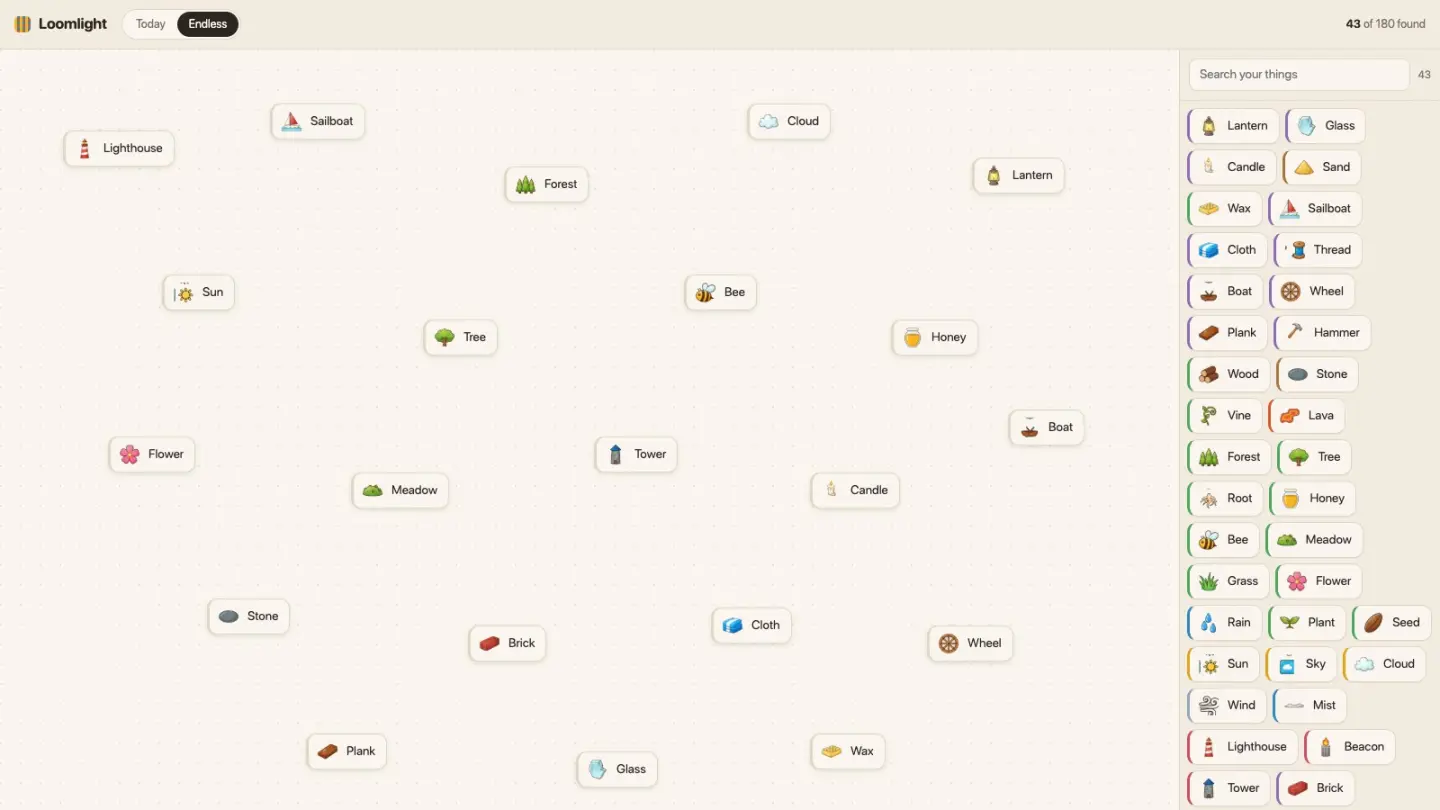
Loomlight is a puzzle about finding the shortest way there. You start with a few things — Water, Earth, Fire and Air, plus three more dealt only to you. Put two of them together and you get a third. Water and Earth make Mud. Mud and Sun make a Seed. There are 180 things to find and over four hundred ways to combine them, and every single one was drawn and written by hand, so nothing you make is nonsense a computer stitched together.
The bar at the top of the window holds everything you need. On the left are the two modes, Today and Endless. On the right is what Today is asking you to make — a lighthouse, a plough, a jar of honey — with your step count beside it, and a target to beat.
That target is the part worth understanding. When the page loads, the game works backwards from today's goal and finds the fewest things anyone could make and still get there, starting from the things you were dealt. So it isn't an average and it isn't a leaderboard. It's the shortest route that exists for you. Match it and you found one of the best routes there is. Every step over it is something you made that you didn't need.
How to play
- Put two things together. Drag one onto another, or tap one and then tap the other. Both do the same thing, so a phone plays it exactly like a computer. You can also drag something straight out of your collection on the right and drop it on the board.
- See what you made. A pair that works turns into the new thing, and a little note tells you what it is. A pair that doesn't work just pushes apart. Nothing here is a mistake — no timer, no lives, and no penalty for trying something silly.
- Keep going until you make the target. Everything you find joins your collection and stays there forever, so you never have to make the same thing twice. That's why the number at the top counts things you made and not clicks.
- Read your result. Making the target opens your card: what you made, how many steps it took, how that compares to the target, and a row of coloured squares — one per step. Close it and there's a See your result button in the bar, so you can look again later.
If you'd rather just be told, the card has a Show a shortest thread button that prints a perfect route. It's a separate button on purpose. Being spoiled should be your choice.
Endless is the other mode, and it has no target at all. Just the four starting things, everything you've ever found, and 180 things to work through at your own pace. It's the right place to be curious.
Controls
| Input | What it does |
|---|---|
| Drag | pull one thing onto another to combine them |
| Tap, tap | tap one thing then another — the same combine, without dragging |
| Click | take a copy of something out of your things, onto the board |
| Enter / Space | combine with the keyboard — pick one thing, then the next |
| Esc | let go of the thing you picked |
| Drag a box | on a computer, draw a box round a few things and move them together |
| Search | find anything you have already made |
| Fullscreen | hides the browser so the game has the whole screen. Press it again to bring the browser back |
Tips for a shorter route
- Your target is yours alone. Two people going for the same goal from different starting things are not solving the same puzzle. Compare yourself to your own target. Comparing step counts with a friend measures the deal, not the play.
- Look at the coloured stripe on each thing. Everything belongs to one of eight families — earth, water, air, fire, life, sky, craft and place — and the stripe tells you which. It's the fastest clue in the game. Something in craft usually wants a material and a tool. Something in place usually wants a building and a setting.
- Work backwards. Ask what the target is obviously made of, then what those are made of, until you reach something you already have. Going forwards is exploring. Going backwards is solving.
- Look for the thing two recipes both want. Everything you find is yours forever, so the shortest routes go through a shared middle step. Spot it early and the last few steps come almost free.
- Explore in Endless, then play Today. Every new thing counts against your step count, including the dead ends. Endless costs you nothing and teaches you the same recipes.
- Use the search box once you have thirty things. It filters what you've already made, and the newest sits at the top — which is nearly always the one you want next.
Good to know
- Nothing to buy and nothing to unlock. No sign-up, no chat, and no way for players to contact each other.
- Your discoveries and results live in this browser and are not sent anywhere. A different browser or device deals you different starting things and a fresh collection.
- Today's target is the same for everyone in the world and changes at midnight UTC. Your starting things are not — those are dealt to you.
- It plays with a mouse, a finger or a keyboard, and needs nothing installed.
Want the longer version, including how Loomlight compares with other element-combining games? Read the Loomlight guide.